As far as our senses go we take them for granted in everyday life. Touch is something that tells us an amazing amount of information – and generally we take it for granted when we consider heat, texture, shape and relating those to “simple tasks”.
I’ve had a tablet for a number of yeas and have found it great for presentations/ webcasts / diagrams / mind mapping / note taking. Recently I upgrading a tablet (x61) to Windows 7. I have been mightily impressed with the improvements for tablet uses. Pen recognition is much better (even with my scrawl) and Office 2010 pen features are also much improved.
what I am really looking forward to is the adoption of touch based technology (and more impotantly software for touch screen technologies). Take the use case away from just mobile workers and industrial control situations and place it into the home/office.
Is it there yet? Well not quite. Up to the end of the last paragraph I had used only a pen with handwriting recognition in windows 7 doing the rest. Amazingly quick, probably 70% of the speed I’m managing with the keyboard which is pretty good. Gesture and touch will be important and a whole new user experience construct may be required (flicking documents to colleagues or team rooms with angle of flick defining where it goes).
Recently makingthenews at CES – suppose you’d call it a re-launch. Looking forward to seeing where it goes and hoping it doesn’t remain a niche. Hopefully the tablet PC blog at MS will see new impetus. We will see! I’m hoping smart phone advances driven by the iPhone will really help here!
Recently Steve and I have been working on some really interesting work which we’ve had to socialise. What has been really interesting is the responses it has provoked within the wider organisation, and more importantly within the elements of the organisation which would be most impacted. I spoke on web meeting today to one group for whom this would cause change, in my typical interactive mode the tablet pen was out and pen functionality in PowerPoint got overused. New blank slides emerged on top of the slides Steve and I had worked up with explanations of new emerging technologies and how we should adopt them.
[and given Graham’s recent post on attribution, mostly Steve’s slides ].
The response was great and the closing comment from the lead was how good it was to see this content and it seemed to me that there was a buzz and motivation around the message, one comment summed it up which was “its great to see that we are doing this”. Its certainly a tactic I’m going to repeat for future services I’m working on. So watch out!
When I was looking for some backup to this thought I came across this great article, the key extracts being:
“When processes change, then people who work in the processes must also change. Any given process includes particular roles in which certain knowledge and skills is required. Changes in these roles requires that the people involved change, which may or may not be good news for them.”
For me this is key but its something I have to consciously remind myself of – I shouldn’t have to because I think I’m very much a people person but I still need to remind myself that there is more outside the work you are immersed in.
I’m looking forward to the day when every web application, both internet and intranet can be used offline. Its not a new request in that Lotus Notes performed this for what seems forever and recently new additions have started to emerge in the form of Google Gears and others.
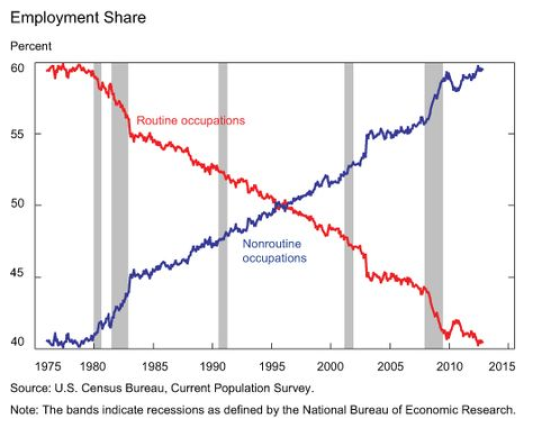
If the task worker got 50 times more efficient in the 20th century then in the early portions of the 21st century the knowledge and information worker should also see a 50 times improvement in efficiency.
How do we do this? Well in hundreds of ways, some existing, some emerging, some not even considered. One such method will be to make the information flow more efficient. I am not talking RSS here I am talking about the integrating the data we work with today with our working requirements, our working styles, our experience of work. Hence do we sync or do we surf? My opinion is that we will start to build systems which understand our information consumption habits, understand our working requirements and sync that data, or maybe cache is a better word as we are likely to be living more in the cloud. And that cloud, as Steve rightly asserts will no longer be simply corporate data but will increasingly be the mixture of personal knowledge, collaborative network knowledge, and corporate network knowledge. Graham also recently asserted that user experience should focus on application speed today, tomorrow maybe its more about information access speed and knowledge transfer capabilities.
Some thoughts, a bit random, but something to ponder for me, and possibly you.
Well no doubt by now most organisations are running round ensuring that they are prepared should the present swine flu outbreak become pandemic. Lets hope not. From personal experience here are the things that people tend to not think about when planning:
If childcare facilities close parents won’t get to a normal place of work or be able to work normal hours.
More employees than you think may be called away from work to support statutory authorities due to their involvement in voluntary activities which may be called upon (certainly in the UK several voluntary agencies are included in the Civil Contingencies Act: St John Ambulance, British Red Cross, Salvation Army and WRVS).
Are your managers and team leads ready for distributed teams (many will be but many won’t be)?
Can people who use desktop computers do their work from their home computer?
I now have 2 voices. We have a new internal platform which allows me to blog and use live writer. So when access to C3 is rolled out to all CSC’ers you can go check it out.
The power of blog authoring tools
We’ve had other tools internally where I could have “blogged” through a web interface. I found I couldn’t sustain any input because I love the simple type and click option in live writer (the ability to type and write at times when I may not have access to the web). So I’m hoping that the authentication mechanism survives and I can continue using live writer. The proof is in the fact that in just a few days I’ve probably blogged more internally than in the previous 12 months.
Its really helpful to have a good internal blogging platform as it means I can write much more (there is so much we all work on that we can’t publicly discuss). I feel a sense of release and hope to use the internal blog to give people more of a flavour of what I do and the directions I think we should be heading.
Personal productivity is an area that I constantly strive to improve on and for those long subscribed here you’ll know I frequently share working practices. Since I took a new role last autumn mine have had to change. I recently had some time off and this system really helped me get back on track. All my tasks are in Remember the Milk and most of the tasks get there through direct messages from twitter (heres how). My mantra for task management now is:
Get everything into remember the milk (RTM).
Quick review daily to prioritise new tasks and define delivery days/times. RTM allows 3 priorities. Also during this daily review I’ll cross off completed actions.
Print the list daily and highlight today’s targets.
Look for calendar time for the most urgent actions.
Weekly thorough review with re-prioritisation.
I don’t use the full GTD methodology though I do like having an empty in-box (never quite achieve it but its generally small).
Prioritisation
As my work has become more intense I’ve had to increasingly use priorities. I now find I generally run on about 3 pages of actions when printed out. The first page generally contains all the high priority actions (in fact I should stop printing the other 2 as I rarely get to look at them).
Stress
I feel less stressed (sounds silly doesn’t it!). I have more work, more actions, more people wanting my input or deliverables from me yet I’m less stressed. All my actions are in RTM. If people chase me I can be polite and explain that they are on my list but not yet the highest priority. I find I don’t get major pushback either. I’m getting more done than before and I put this down to a combination of prioritisation and blocking time in the calendar for tasks – sure I get interrupted or diverted to other priorities but it seems to be working for me. I hope it can work for you too if you are struggling. Love to hear your stories.
Last Friday Charlie (@chuckstar76) and I caught up in a newly opened cafe at Astley Park. While there is nothing unusual in this, I’m a firm proponent of getting somewhere different and away from the office, what was great was we found a hidden Gem. Not the cafe as that was a bit overpriced, slow service and small portions. However, just round the corner to the cafe (the cafe is actually in the refurbished coach house of an old hall) is Astley Hall.
Its now owned by our local council and had free admission. I know the place well and wanted to show Charlie where I got married (as we hired one of the rooms back in 2002).
One room of the hall has this exhibition running, What a superb 5 minutes to take the brain away and into another place. Reminded me of the hidden gems we can all unearth when we give ourselves some time to explore:
It was late Friday afternoon. I was looking forward to the weekend. I hadn’t responded to a voicemail from earlier in the day … then I got on the follow-up call, just a quick question. Well it turns out the account director for one of our customers could see huge potential for collaboration and will talk to the customer CFO. Excellent news as always – I love people who bring leads rather than having to create them. The real work here though is that the CFO requires figures on cost savings and return on investment rather than my preference for talking about value. Sure we can talk brilliantly about savings associated with removing the need for travel but its much less tangible and quantifiable when we get to collaboration based on knowledge, documents or social networks.
Inside I was thinking about org culture, likelihood of adoption, propensity to collaborate, specific processes/projects/business challenges, key events and many more. Assessing all these factors will help understand what the business needs to collaborate on, and with who – following that point we can get to an appropriate collaboration tooling before some proof of concepts and pilots. Articulating this will be the key for success here…off we go on the adventure. Incidentally, I really liked Hichcliffe’s post last week about ROI of enterprise 2.0 tools.
Am I the only person who prefers to talk value over cost?
This video shows a vision of how technology becomes a 6th sense for people in their everyday lives, really interesting to see how this shapes from research process into real technology in the coming years:
This for me is a little weaker than 6th sense, however I can see it being really useful for certain use cases and people, the example of people who don’t want to use computers is good. Other examples I can think of are rail tickets (write “return ticket to preston” on the pad and the machine prints your ticket after appropriate payment).
Virtual Worlds and how they may be integrated to the enterprise – link
This really focuses on touch and smart surfaces of all kinds. I really like the ideas around using your finger as a mouse and the potential flexibility intelligent surfaces give for input of information. Not too sure on the visualisations for outputting information in this video but these things will be tuned with time.
What is clear from all these videos is that if we thought change in information technology had been rapid in the previous 10 years then its absolutely nothing compared to what we are going to see. I love the thoughts about a 6th sense, that of information available permanently wherever I am and in context of what I am doing. I’m looking forward to the rollercoaster which will take us there! Its also going to be amazing to watch where 6th sense adoption takes place first, I’m guessing it won’t be the west where we are PC/Laptop device oriented and more likely to be China where mobile devices are the predominant form factor.
It was an excellent discussion with important points raised around meeting people in person, eye contact, the power of serendipitous conversations in the office, being able to visually assess products (and how that can’t be done remotely).
The discussion moved quickly and then talked about home working, given travel issues this week with snow in some areas of the UK it was relevant. The panel were quite divided in their view on home working, but all agreed that it suits specific individuals better than others and that actually a hybrid working pattern is their favoured approach.
I tend to favour the views that support location independent working, and absolutely agree that everything is a hybrid, I cannot think of any way that people could work 100% at home, or for me I find it strange to think of a world which would be 100% office (but again that comes down to work requirements and work style – and my work can be performed flexibly).
One point they didn’t raise which was a shame was day extenders, or time shifters. Those who’d like to work in the evening in order to spend more daytime with families. I think that will be more and more important in the future.
Welcome to my blog on end user and collaboration technologies, amongst other things! The views here are my own and do not necessarily reflect those of my employers.
Recent Comments